
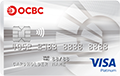
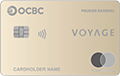
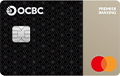
Bank effortlessly with our full range of digital services






Manage your money at your fingertips!
Enjoy easier banking with our eBanking and Mobile Banking service. Just register on our website using your ATM or Credit Card.

Investment Account Opening
Open an investment account in a few simple steps and start your investment journey.

Time Deposit
Conveniently place or renew a time deposit online.
Explore more

Account Enquiry
Easily manage your portfolio online. Get an at-a-glance view of transaction history, account balance total assets and liabilities, and more.
Explore more
Foreign Exchange
Trade in 14 major currencies and enjoy competitive exchange rates, preferential interest rates, low spreads and the convenience of our preset buy/sell order service.

Cheque book request
Apply for a cheque book online anytime, anywhere.

eBanking Registration
Register for an eBanking account online with your ATM or Credit Card.

Cross-Border Services
Our Wealth Management Connect Service (Southbound and Northbound) connects you with investment opportunities in the Greater Bay Area and beyond.
Explore more

Securities
Grow your wealth by trading with our intuitive securities trading platform.
Explore more

Unit Trusts
Designed with your needs in mind, our online unit trust service offers convenience and flexibility.
Explore more

Currency-linked Deposits
Enjoy greater growth potential by placing Currency Linked Deposits online — anytime, anywhere.
Explore more

eIPOs and Financing
Explore greater potential returns through our secure and user-friendly eIPO and Financing services.

Overseas ATM Withdrawal Maintenance
Easily activate or change the withdrawal amount for overseas ATM transactions when you travel.

Daily Limit Maintenance
Update your daily transaction limits to meet your different needs.

eStatement/eAdvice Service
Convenient, speedy and secure - Register for our e-Statements and e-Advice service today.
Explore more
Get started
Download and log in to the latest OCBC Bank Mobile App.
Investment Account Opening
Open an investment account in a few simple steps and start your investment journey.
Explore more
Time Deposit
Conveniently place or renew a time deposit online.
My Portfolio & "More" function menu
New home experience & function menu to meet your banking needs with a more convenient user experience.
Foreign Exchange
Trade in 14 major currencies and enjoy competitive exchange rates, preferential interest rates, low spreads and the convenience of our preset buy/sell order service.

Gold Trading
Trade gold products online according to your own investment goals.
Explore more
eBanking Registration
Register for an eBanking account online with your ATM or Credit Card.
Explore more

Local Fund Transfers
Transfer funds and make payments online with ease.
Explore more
Remittance Service
Make overseas transfers via secure bank-to-bank networks.
Explore more
Cross-Border Services
Our Wealth Management Connect Service (Southbound and Northbound) connects you with investment opportunities in the Greater Bay Area and beyond.
Explore more

Bill Payments
Discover a simple and convenient way to pay your bills online.
Explore more
Scan & Pay
Easily transfer money by simply scanning a QR code.
Securities
Grow your wealth by trading with our intuitive securities trading platform.
Explore more
Unit Trusts
Designed with your needs in mind, our online unit trust service offers convenience and flexibility.
Explore more
Currency-linked Deposits
Enjoy greater growth potential by placing Currency Linked Deposits online — anytime, anywhere.
Explore more
eIPOs and Financing
Explore greater potential returns through our secure and user-friendly eIPO and Financing services.
Biometric Login Activation
Enjoy a smooth and secure digital banking experience with biometric login.
Explore more

ePIN Reset
Reset your eBanking account with your ATM or Credit Card.
Explore more
ATM Card Activation
Activate your ATM card through your mobile phone.
Explore more

Dormant Account Activation
With just a tap, you can quickly reactivate a dormant account.
Explore more
eStatement/eAdvice Service
Convenient, speedy and secure - Register for our e-Statements and e-Advice service today.
Explore more

Push Notification Service
Enable push notifications and receive important account updates.
Explore more

Soft Token
Our new soft token brings you a smarter banking experience.
Explore more

Update Personal Details
Online update your personal details (contact number, email address, address, employment information) within one working day at the earliest, saving you valuable time from visiting the branch in person.
Daily Limit Maintenance
Update your daily transaction limits to meet your different needs.
Explore more
Please download mobile applications from official application stores or OCBC Bank website and ensure the search wording is valid.
iOS
- iOS users may download "OCBC Bank Hong Kong" via App Store
Android
- Android users may download "OCBC Bank Hong Kong" via Google Play
- For Android users who are unable to access the Google Play Store, please follow the below steps for manual android package installation.
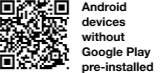
Android devices without Google Play pre-installed
- Select “System Settings” > “General” > “Security” or the equivalent setting on your mobile device
- Enable “Unknown Sources”
- Scan the QR code below / Click here to download the “OCBC Bank Hong Kong” Android Application Package (APK)
- Open the downloaded APK file and proceed with installation
- Disable “Unknown Sources” after installation complete.



Frequently Asked Questions
Remarks
- Payment via Bill Template does not require two-factor authentication. The Bank will send a SMS notification to your pre-registered mobile phone number (if any) upon successful payment (except "Primary or Secondary Education", "Post-secondary or Specialised Education", "Government or Statutory Organisation" and "Public Utility" category).
- The above products and services are subject to the relevant terms and conditions. For details, please visit any of our branches.
- Apple and the Apple logo are trademarks of Apple Inc., registered in the U.S. and other countries. App Store is a service mark of Apple Inc.. Android, Google Play, and the Google Play logo are the registered trademarks of Google Inc.
- Payment to non-registered bills (except "Primary or Secondary Education", "Post-secondary or Specialised Education", "Government or Statutory Organisation" and "Public Utility" category) requires confirming the transaction by two-factor authentication (i.e. a One-Time Security Code generated by your Security Device ). Upon confirmation by two-factor authentication, a Bill Template will be created automatically.
- Payment via Bill Template does not require two-factor authentication. The Bank will send a SMS notification to your pre-registered mobile phone number (if any) upon successful payment (except "Primary or Secondary Education", "Post-secondary or Specialised Education", "Government or Statutory Organisation" and "Public Utility" category).
- You are advised to conduct regular review and delete unnecessary Bill Template via Internet Banking or Mobile Banking. A Bill Template will be deleted automatically if no payment was conducted for more than 12 months, or the merchant has ceased to be an ePayment merchant or terminated that bill type.
- Payment or donation service require applying ePayment Service in advance.